Online Proctoring Software — AI Proctored Exam
BlinkExam AI proctoring monitors online exams using configurable signals such as multiple-person detection, phone detection, audio alerts, browser tab switching and timestamped evidence. Administrators can review flagged events before making examination decisions.
Discover the Ideal Online Proctoring Software for Your Exams
Select the AI proctored exam software that fits your requirements — live monitoring, recorded video review, image tracking, or full 360-degree coverage.
- Live Monitoring
- Video Proctoring
- Image Tracking
- 360-Degree Proctoring
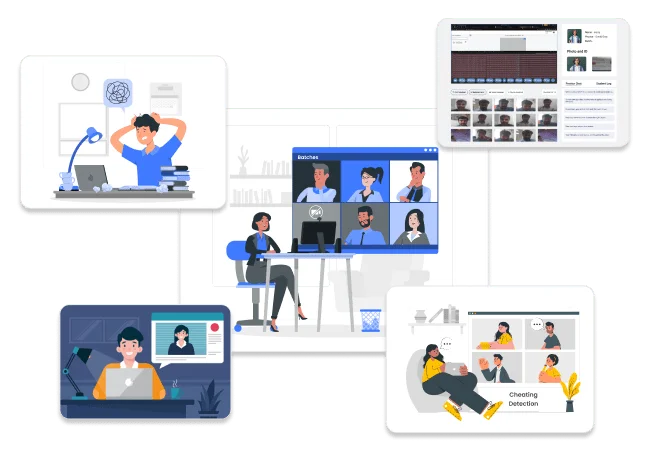

Live Monitoring
Our platform offers real-time monitoring of all test-takers on a single screen. Proctors can easily oversee multiple candidates at once, ensuring immediate detection of any suspicious behavior during exams.

Video Proctoring
We provide automatic recording of entire exam sessions. Our system captures any unusual activities, such as third-party presence or unexpected sounds. Proctors can efficiently review these recordings after the exam.

Image Tracking
Our platform takes regular screenshots of test takers every 10 seconds. These images track eye movements, posture shifts, and other behaviour, allowing proctors to quickly review candidate activities after the exam.

360-Degree Proctoring
Our platform provides comprehensive monitoring of the entire test environment. Using advanced technology, it offers a complete view of the exam space, eliminating blind spots and ensuring thorough oversight throughout the assessment.
Our online proctoring software offers administrators the following key features
Batches
Our platform enables you to divide students into manageable groups, simplifying administration for large test-taker numbers. This allows efficient organization and monitoring of multiple exam sessions simultaneously.
Cheating Detection
Our system identifies multiple forms of academic dishonesty, detecting behaviors like using unauthorized materials, screen sharing, or receiving outside assistance. This ensures a fair and secure testing environment for all participants.
Suspension
Our platform automatically suspends students who repeatedly break exam rules. The system tracks violations and blocks these students from further exams, maintaining fairness without the need for constant intervention.
Recorded Video
If the admin needs the recorded video at the exam’s end, it will be provided, capturing the full exam duration, including audio and video, for complete transparency. It serves as a valuable resource for reviewing performance and ensuring integrity.
Event Report
Our online proctoring software generates a full report, including photos, videos, and screenshots from the exam, detailing each question attempted, the order of attempts, and any messages to the proctor for full transparency.
Proctor Assignment for Candidates

Dedicated Proctor
Each student is assigned a proctor from our team of teachers. This proctor oversees the exam to ensure fairness and integrity.

Warning Message
If the proctor detects any suspicious activity, a warning message is sent to the student, reminding them to adhere to the exam rules.

Suspension Message
If the student continues to engage in cheating after the warning, a suspension message is sent, and the exam is terminated.
Our AI Proctored Exam Software offers students the following key features

Compatibility
The system works with your device’s camera and microphone. It ensures that both are functioning correctly before the exam starts to facilitate smooth communication and monitoring.

Face Verification
Every 10 seconds, a screenshot is taken to verify the candidate’s identity. This frequent monitoring helps ensure that the right person is taking the exam and maintains the exam’s integrity.

Tracking Detection
The system detects the presence of other people, devices, or books in the exam environment. It helps prevent cheating by alerting if there are unauthorized items or people nearby.
Global service operates across multiple time zones, catering to users around the world.
Use BlinkExam AI proctoring for school exams, entrance tests, certifications, corporate assessments, and semester exams.
 School Exam
 Entrance Exams
 Award & Certification
 Hiring assessment software for corporates
 Semester Exams
 Proctor Exams
Who AI proctoring is for
Operators choose BlinkExam proctoring for corporate hiring drives and institute high-stakes papers — not as a candidate “anti-cheat tip” page.
Corporates
Hiring assessment software for corporatesHiring drives and certifications with AI proctoring and evidence review.
Request a corporate demoInstitutes
Online exam software for institutesHigh-stakes papers, batches, and certifications on one stack.
Request an institute demo
Frequently Asked Questions (FAQs)
Who uses BlinkExam online proctoring software?
When should we use AI proctoring instead of OTS alone?
What does AI proctoring monitor for administrators?
Do candidates need a webcam and microphone?
How do corporates and institutes get started?
See BlinkExam in
action. Free for 7 days.
No credit card required. Get a personalized walkthrough with our solutions team and run a live pilot exam on your own candidates.